Alarm Clock
- 4.4
- Rating
- 1.00M
- Installs
- Free
- Price
 Analysis by App-foxy
I tend to judge an alarm app by a simple question: does it help me remember the right thing at the right moment without becoming another source of work? Alarm Clock, from Caller ID Name, takes that practical approach. It is a free productivity app built around alarms, reminders, wake-up alerts, and notifications after calls. That combination makes it more useful than a basic morning alarm for some people, although it is not automatically the best replacement for every reminder or calendar tool.
After spending time with it, I see the app as a focused choice for people who want one place for time-based prompts. Its strongest idea is not novelty; it is convenience. Instead of treating waking up, remembering a task, and receiving an alert after a call as completely separate jobs, it brings those moments into one compact utility. The real benefit is reducing the number of small reminders I have to manage across different apps.
How I would decide whether Alarm Clock fits
The first decision is what kind of reminder problem you are trying to solve. If you mainly need a morning alarm, the familiar clock app already on your phone may be enough. If you want a quick alert for an appointment, a personal task, or something that should happen after a phone conversation, this app becomes more interesting. It sits between a traditional alarm clock and a lightweight reminder tool.
You May Also Like

 Blood Strike: 2.5 Anniversary
Blood Strike’s Loadouts Turn Every Drop Into a Tactical Gamble
A close look at Blood Strike’s custom loadouts: how fast access to signature weapons reshapes its battle royale rhythm, rewards preparation, and narrows the gap between fights.

 Pandora - Music & Podcasts
Pandora’s Music Is Easy to Start, but Harder to Recover
Pandora’s strength is its low-effort path from a seed to a station. Its weak spot is how much confidence it asks you to place in connection, setup, and quiet recovery.

 8 Ball Pool
 Is Built on Rivalries, Rematches, and Routine
A close look at the rivalries, rematches, shared routines, and unanswered safety questions that turn a quick pool match into a persistent mobile community.

 Samsung Music
’s Quiet Strength Is Playing What You Already Own
Its reach comes less from spectacle than from dependable access to a personal library. That simplicity is both the app’s strongest retention engine and its ceiling.

 AccuWeather: Weather Radar
AccuWeather Review: A Quick, Clear Forecast for Everyday Decisions
For everyday plans, the best forecast is the one you can understand quickly. AccuWeather makes rain timing, radar, and local conditions easy to act on, with a few trade-offs.

 Hill Climb Racing
Why Hill Climb Racing Still Turns Crashes Into One More Run
A tiny car, a bumpy hill and one more upgrade: Hill Climb Racing keeps resurfacing because its simple chaos makes every near-miss feel personal.
More From Our News Desk



I would also consider how much structure you need. A calendar is better when reminders must be connected to meetings, locations, invitations, or a busy schedule. A task manager is better when an item needs notes, priorities, subtasks, and a completion history. Alarm Clock makes more sense when the important detail is simply when should I be alerted?
That distinction matters because a small app can feel wonderfully direct when your needs are simple, but limited when your routine becomes complicated. I found the appeal strongest for short, time-sensitive prompts rather than long-term planning. It does not ask me to build a whole productivity system before I can set an alert.
The app is free, rated for Everyone, and works on devices running Android 10 or later. Its current version is 4.4, so anyone using an older phone should check compatibility before planning a switch. The developer is Caller ID Name, and the app has passed the stage of being an obscure experiment: it has more than a million installs, with an average rating of four stars from roughly fourteen thousand ratings. Those figures suggest a substantial user base, while still leaving room for individual experiences to vary.
What I look for during everyday use
For an alarm application, I pay attention to three things: how quickly I can create an alert, whether the purpose of each alert stays clear later, and how confidently I can rely on it when the phone is not in my hand. The first two are about design and organization. The third depends partly on the phone itself, including notification behavior and battery management.
I also ask whether the app helps me avoid accidental reminders. A prompt that is too vague can be almost as unhelpful as no prompt at all. I prefer writing a short action in the label, such as “take the parcel downstairs” or “call the clinic,” rather than leaving a generic alarm name. That small habit makes the alert more useful when it appears during a busy day.
One non-obvious advantage of using a dedicated alarm tool for these moments is mental separation. I can reserve calendar entries for commitments involving other people and use an alarm for something I personally need to remember. That prevents my calendar from becoming cluttered with every minor action. It is a useful boundary, especially for people who find elaborate productivity systems tiring.
A realistic routine with the app
Imagine I am working from home and receive a call about a package that must be collected later. I do not want to create a full calendar event because nobody else needs to attend, and I do not want to trust myself to remember it after the conversation ends. An alert connected with the call gives me a practical way to turn that conversation into a later prompt.
The same pattern works for a follow-up call. I can finish speaking, set a reminder for the time when I expect to call back, and return to my work without keeping the task in my head. This is where the app feels more distinctive than a plain wake-up clock. It connects a communication moment with a future action instead of treating the two as unrelated.
There is a useful trade-off here. A call-based alert is convenient when the call itself is the trigger for remembering something, but it should not replace a proper appointment system for important commitments. If the time, participants, or location may change, I would still use a calendar entry. I see Alarm Clock as the fast capture layer, not the complete record of a complicated event.
Where it wins, and where another tool may fit better
I find this app’s strongest case is the moment a call leaves me with something to do later: a quick, clearly timed prompt can keep that promise from slipping into the rest of the day. Its focused approach is useful when I want an alert rather than another place to manage a project, while a calendar or task tool is better when the reminder needs shared context or a longer trail.
Why its focused approach works
The clearest strength is speed. A reminder app can sometimes encourage overthinking: should I add a category, a due date, a note, a priority, or a recurring task? Alarm Clock is more appealing when I already know the essential information and want an alert without building a detailed workflow around it.
It is also a sensible option for people who use alarms beyond waking up. Many users already understand the basic alarm pattern: choose a time, give it a purpose, and wait for the notification. Applying that familiar behavior to errands and post-call follow-ups lowers the learning curve. I would recommend it to someone who dislikes complex task managers but still misses occasional time-sensitive chores.
Another concrete tip is to use different wording for different kinds of alerts. For waking up, a short label is enough. For a reminder after a call, include the action and the person or subject involved. For an interruption-sensitive task, include the reason the alert matters. This makes the app more valuable without requiring extra features or a larger system.
The app can also help people who work in blocks. I might set an alert to stop a task, switch to another responsibility, or check something after a conversation. That is different from tracking every task in a productivity dashboard. The alarm becomes a boundary around my attention, which can be useful when a written to-do list is too easy to ignore.
When the usual alternatives are stronger
The standard clock app remains the better choice for someone who only wants dependable wake-up alarms and already likes the phone’s built-in controls. There is little reason to install another tool merely to repeat a function that is already comfortable. Alarm Clock earns its place when the reminder and after-call angle matter to you.
A calendar is the stronger alternative for appointments, travel, shared plans, and anything that needs context. Calendars are designed to show a day or week as a whole, while an alarm app is designed to make one moment hard to forget. If I need to understand how several commitments collide, I would not rely on a list of isolated alarms.
A task manager is preferable for projects that continue over several days. It can usually keep unfinished work visible and help me decide what to do next. Alarm Clock is less suitable when the task itself needs a long description or a chain of steps. I would use it to prompt the next action, not to store the entire project.
Voice assistants and quick-note tools may be faster when I am carrying something, driving, or unable to type. Their advantage is immediate capture. Alarm Clock may be better afterward if I want the reminder to exist as a deliberate time-based alert rather than as an item buried in notes. The right choice depends on whether speed of capture or clarity of the final alert is more important.
Small limitations that affect the decision
The focused design can become a limitation if you expect a complete personal organizer. I would not choose this app as my only system for work planning, shared schedules, recurring projects, or detailed habit tracking. Its usefulness depends on keeping the job narrow: tell me when to pay attention.
There is also a human reliability issue. An alarm can notify me, but it cannot guarantee that I will act. For important reminders, I would write a clear label and avoid creating too many alerts close together. A crowded stream of alarms can train me to dismiss them automatically. The app works best when each alert has a specific purpose and a realistic time.
Phone settings deserve attention too. On Android, notification controls and battery-saving behavior can influence how any alarm-style application behaves. I would check that alerts are allowed and that the app is not being restricted by aggressive power management. This is not a criticism unique to Alarm Clock; it is a practical step for anyone depending on a phone notification.
I would also be cautious about using a single alarm for something with serious consequences. For an important medication schedule, a critical work obligation, or a travel connection, I prefer a backup reminder or a second method. Alarm Clock can be part of that arrangement, but I would not make one phone alert my only safeguard.
The cost of changing from another reminder system
Because the app is free, the main cost of switching is not money. It is adjustment. I would need to decide which existing alarms belong here, which should remain in the default clock, and which reminders should stay in my calendar or task manager. Moving everything at once could create duplicate alerts and unnecessary confusion.
A safer approach is to test one category first. I might use Alarm Clock for post-call follow-ups for a week while leaving morning alarms unchanged. That makes it easier to judge whether the workflow actually saves time. If it works, I can gradually move simple personal reminders into the app. If it does not, I have not disrupted my entire routine.
Before switching, I would write down the few alerts I genuinely depend on and recreate them carefully. I would not assume that changing apps automatically preserves my old setup. The practical lesson is simple: treat the move as a fresh organization exercise, not as a button that magically transfers every habit.
There is also a cost in attention. Every new reminder app adds another place to check and another notification style to recognize. The benefit is worthwhile only if the app replaces scattered reminders instead of adding a further layer. I would keep the number of active systems low and give each one a clearly defined job.
Who should use it, and who should skip it
I think Alarm Clock is a good match for students, home workers, caregivers, and busy phone users who need quick time prompts without the weight of a full planning platform. It is especially suitable for people who regularly say, “Remind me after this call,” or who need a simple alert for a one-off responsibility later in the day.
It may also suit someone who wants a free productivity utility with an Everyone age rating and a familiar alarm concept. The app does not require me to think of reminders as elaborate records. That simplicity can be a strength for a family member or friend who finds task-management applications intimidating.
I would skip it if my priority is a powerful calendar, shared household planning, detailed recurring tasks, or a complete project-management workflow. I would also stay with the built-in clock if I only need to wake up and have no interest in call-related or general reminder use. In those cases, adding an app may create more maintenance than value.
My recommendation after weighing the trade-offs
My recommendation is positive, but specific: try Alarm Clock if you want a simple bridge between waking alarms, personal reminders, and follow-ups after calls. The free price makes experimentation easy, and its productivity focus is clear enough that I can understand where it belongs in my routine. I would begin with one real use case rather than replacing every alarm immediately.
What I like most is the way it turns a fleeting intention into a timed prompt. That is a small problem, but it appears often in everyday life. The app is most convincing when I need to remember an action after a conversation and do not want to create a full calendar event.
My final advice is to keep labels precise, test the alert behavior on your own phone, and avoid using it as a substitute for every organizational tool. Choose it for quick, time-centered reminders; choose a calendar or task manager when context and ongoing planning matter more. With that expectation, Alarm Clock is a practical free option rather than an overbuilt system, and that restraint is exactly why it may fit your day.
FAQs for Alarm Clock
01What features does the Alarm Clock app offer?
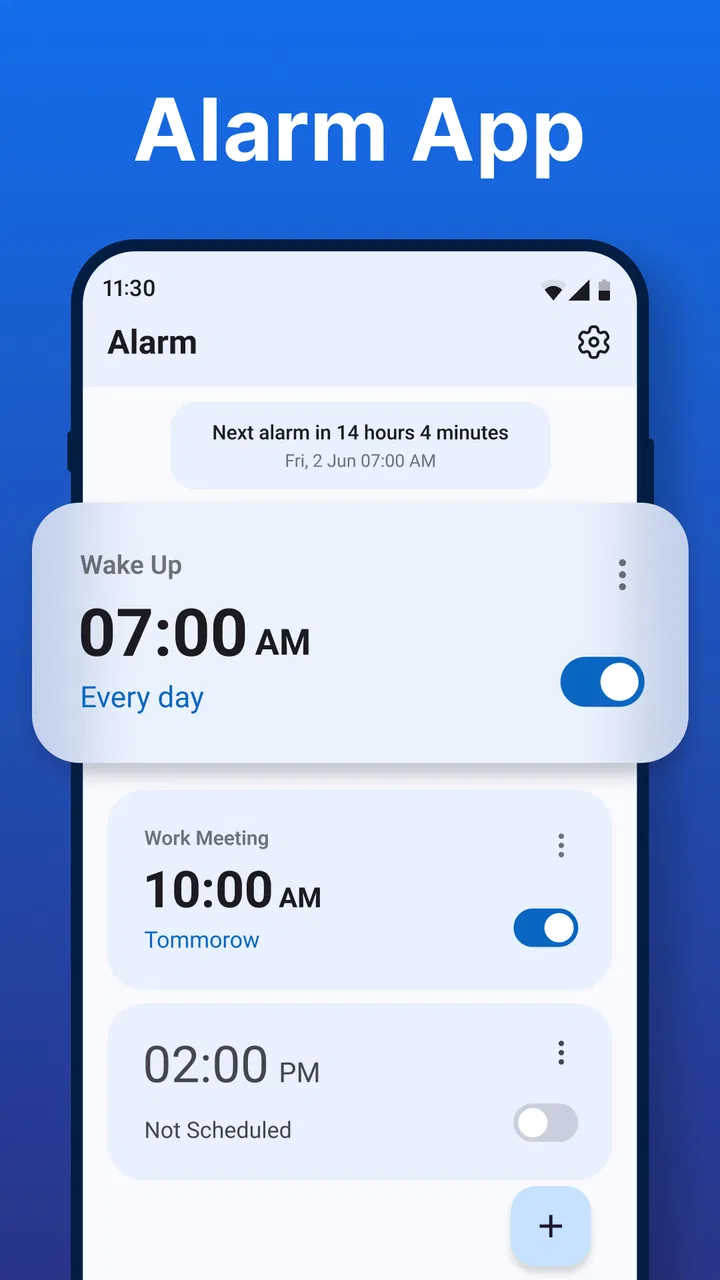
The Alarm Clock app provides a variety of features including customizable alarm tones, snooze options, recurring alarms, and a built-in timer and stopwatch. It also offers a night mode for reduced screen brightness and a range of themes to personalize the app’s appearance, making it both functional and user-friendly.
02Can I set multiple alarms and customize them individually?
Yes, the Alarm Clock app allows you to set multiple alarms and customize each one individually. You can choose different tones, set specific days for the alarm to repeat, and adjust snooze durations, providing flexibility to tailor the alarms to your specific needs and schedule.
03Does the Alarm Clock app integrate with other apps or devices?
The Alarm Clock app integrates seamlessly with other apps and devices. It can sync with your calendar apps to alert you about upcoming events and appointments, and some versions can connect to smart home devices, allowing you to control lights or other smart features when your alarm goes off.
04Is the Alarm Clock app available for both Android and iOS devices?
Yes, the Alarm Clock app is available for both Android and iOS devices. It can be downloaded from the Google Play Store and Apple App Store, ensuring compatibility across different platforms and providing users with a consistent experience regardless of device type.
05Are there any additional costs or in-app purchases in the Alarm Clock app?
The basic version of the Alarm Clock app is free to download. However, it offers in-app purchases for premium features such as additional alarm tones, advanced settings, and ad removal. These optional purchases enhance the app’s functionality and user experience.
Pros
- Intuitive user interface that's easy to navigate.
- Wide range of customizable alarm tones.
- Snooze options are highly adjustable.
- Includes a built-in timer and stopwatch.
- Minimal impact on battery life.
Cons
- Ads can be intrusive during use.
- Limited free features without upgrade.
- Occasional bugs with alarm sound.
- Lacks integration with smart home devices.
- Requires internet for weather updates.

Alarm Clock
Gallery